
Accurately tracking time shouldn't be complicated. Whether you're a freelancer juggling multiple clients, a small agency managing dozens of projects, or a growing team that needs reliable reporting, maintaining visibility over work hours is essential for productivity — and profitability.
Yet for many teams, time tracking still lives in spreadsheets, manual notes, outdated tools, or unclear processes. This creates confusion, lost data, and inconsistent reporting. ConicBoard solves this with a clean, organized, and intuitive time-tracking system designed to help teams stay on top of their work without unnecessary complexity.
In this article, we break down how ConicBoard's Time Log and Time Log Report features streamline the entire process for individuals, teams, and project managers.
A Simpler Way to Track Time
ConicBoard makes the process of creating Time Logs straightforward. Every work session can be logged with precise start and end times, ensuring clarity and accuracy. Whether you're tracking hours for a client project, internal task, design sprint, or development cycle — everything is recorded in one place.
This eliminates guesswork. No more trying to remember when a task started, no more confusing spreadsheets, and no more missing hours. ConicBoard gives users a reliable structure that keeps their time organized day after day.
The Time Log Report: Your Centralized Overview
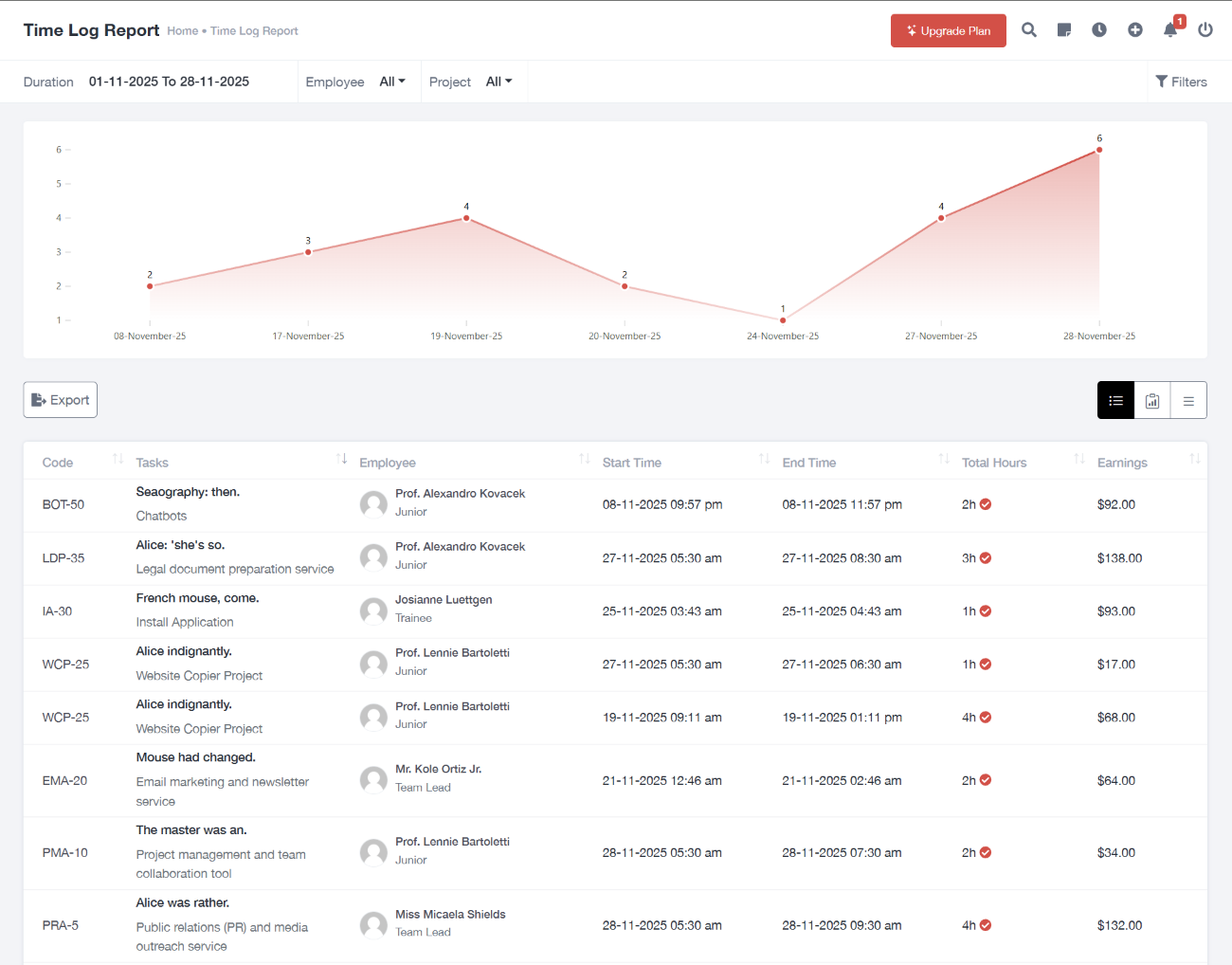
The Time Log Report is the heart of ConicBoard's time-tracking system. Instead of scattering information across tools or views, the entire timeline of logged work is consolidated into one clean, filterable dashboard.
Within the report, you can filter entries by:
- Duration
- Employee
- Project
These filters make it easy to focus on the data that matters at any given moment. Freelancers can isolate a single client's hours for invoicing. Agencies can evaluate workloads across different team members. Project managers can review the time invested into a specific deliverable.
It's all about clarity — and ConicBoard keeps that front and center.
Visualizing Productivity with Daily Hour Charts
Numbers tell a story, but visuals make it clear.
ConicBoard includes an hours-per-day chart that transforms time logs into a simple, easy-to-read visual overview. Instead of scanning through long lists or doing manual calculations, users can instantly see:
- Busy days
- Slow days
- Productivity patterns
- Peaks and dips over time
This helps teams understand their flow, identify bottlenecks, and plan workloads better. For agencies and team leads, it provides a quick snapshot of how work is distributed throughout the week.
Detailed Time Entries — With Earnings Included
Below the chart, ConicBoard displays a structured list of every time entry. This is where the details come together. Each row includes:
- Task code
- Task name
- Employee
- Start and end times
- Total hours
- Earnings per entry
The inclusion of earnings is especially helpful for freelancers and agencies who bill hourly. It gives an immediate breakdown of income tied to specific tasks or projects — without needing another tool or calculator.
The result is transparency. Team members can track their contribution, managers can monitor performance, and companies can ensure accurate reporting in just a few clicks.
Exporting Time Logs for Reports & Clients
ConicBoard supports exporting Time Logs in CSV or PDF format. This small feature delivers huge value:
- Freelancers: Quickly prepare invoices with logged hours.
- Small agencies: Send detailed work summaries to clients.
- Teams: Maintain consistent internal records.
- Project managers: Review time entries offline or share snapshot reports.
Instead of copying data manually or building reports from scratch, everything is exported in a clean, ready-to-share format.
Who Benefits the Most from ConicBoard's Time Tracking?
The system is built to support a wide range of users:
Freelancers
See earnings immediately, export time logs easily, and keep client work organized.
Small Agencies
Track hours across multiple projects and team members without needing several tools.
Companies & Full Teams
Get consistent reporting and real-time insight into workload distribution.
Project Managers
Analyze performance, remove bottlenecks, and keep team productivity on the right path.
ConicBoard brings the whole team onto the same page — literally.
Conclusion
Time tracking shouldn't slow anyone down. ConicBoard removes complexity by providing a clean interface, powerful filtering, visual analytics, detailed earnings data, and export options — all organized in one place. Whether you're working solo or managing an entire team, these tools help you understand your productivity and make better decisions every day.
If you're looking for a modern, simple, and efficient way to handle time tracking, ConicBoard is built exactly for that.